
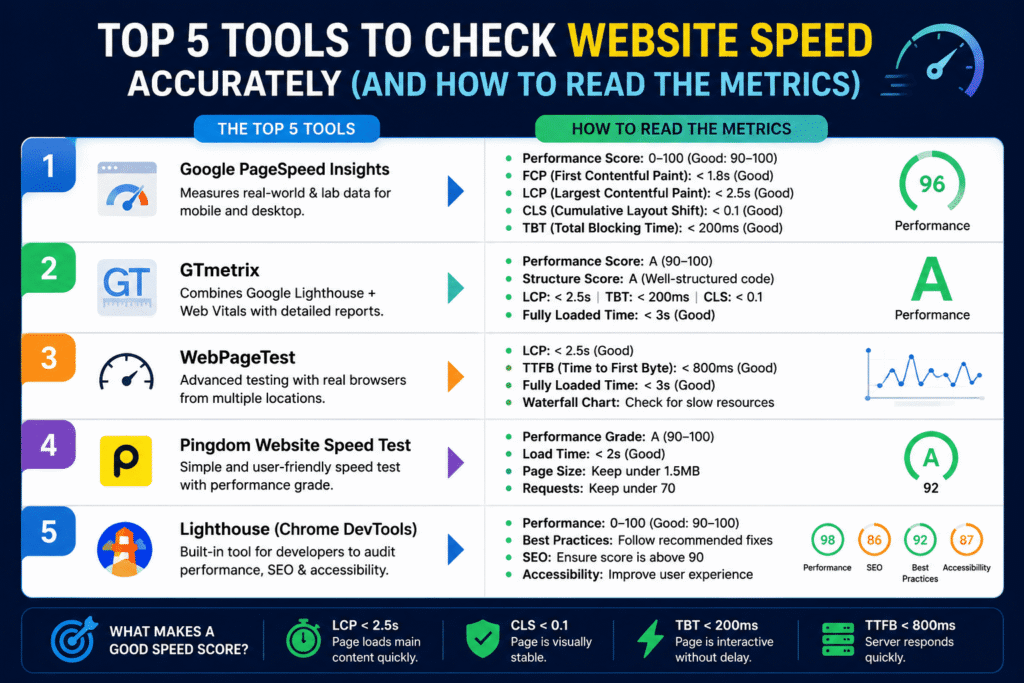
Looking for the best website speed test tools? Whether you need page speed test tools for a quick check or ongoing website performance monitoring, here are the 5 most accurate, developer-trusted tools available today. Imagine spending thousands of dollars on monthly marketing campaigns in premium markets like the USA, UK, or Canada, only to discover that half of your traffic bounces before your homepage even opens.
In today’s fast-paced digital economy, website speed dictates your conversion rates. If your site takes more than 3 seconds to load, you are actively losing customers to your competitors. To fix your speed, you must first measure it accurately using reliable website speed test tools — running a single test on a random browser isn’t enough. You need professional diagnostic software that tells you exactly what script, image, or plugin is lagging.
What Is a Website Speed Test Tool?
A website speed test tool is an online or browser-based tool that analyzes how quickly a web page loads and identifies factors that may affect its performance. Using reliable page speed test tools, you can check loading times, Core Web Vitals, server response, page size, and other performance metrics. These tools make website speed checking easier and help developers and business owners identify areas that need improvement before slow performance affects visitors and conversions.
1. Google PageSpeed Insights (PSI)
As Google’s official PageSpeed tool, PageSpeed Insights is one of the most widely used tools for checking website performance and understanding how a page performs in search and real-world user conditions.
- Why it matters: It scores your site based on Core Web Vitals—Google’s real-world user experience metrics.
- Key feature: It splits your score into Mobile and Desktop views, showing you exactly how mobile responsive your layout is.
- What to look for: Focus on your Largest Contentful Paint (LCP). If it is over 2.5 seconds, Google considers your website slow.
2. GTmetrix
GTmetrix is the gold standard for web developers worldwide because it provides incredibly deep, actionable technical insights.
- Why it matters: It scores your website’s performance and structure from ‘A’ to ‘F’ and maps out a literal timeline of how your page elements load.
- Key feature: It allows you to test your site from different global servers (e.g., London, New York, Vancouver) to see how fast it loads for your target country’s audience.
- What to look for: Check the Total Blocking Time (TBT). High TBT means you have bloated JavaScript or unoptimized plugins locking up your site.
3. Pingdom Tools
If you want a clean, simple, and straightforward test that isn’t bogged down by overly complex coding jargon, Pingdom is your best bet.
- Why it matters: It provides a highly scannable analysis of your page size, load time, and the total number of requests sent to your server.
- Key feature: The “File Requests” waterfall chart visually showcases which individual product images or external fonts are taking the longest to download.
4. WebPageTest
WebPageTest is a highly advanced, open-source tool favored by enterprise-grade development agencies.
- Why it matters: It lets you run multiple consecutive testing runs to eliminate anomalies and simulate exact real-world connection configurations (like a slow 4G network on an iPhone).
- Key feature: It captures a frame-by-frame video of your site loading, allowing you to visually pinpoint structural shifts or broken elements.
5. Lighthouse (Chrome DevTools)
Built directly into the Google Chrome browser, Lighthouse allows you to perform automated speed audits locally without even visiting an external web platform.
- Why it matters: It tests your website for Speed, Accessibility, Best Practices, and baseline On-Page SEO all at once.
- Key feature: Because it runs locally inside your browser, it is a fantastic tool to check password-protected staging sites before pushing your code edits live.
How to Check Website Speed
To check website speed, enter your website URL into a reliable web page speed checker such as Google PageSpeed Insights, GTmetrix, Pingdom, or WebPageTest. Run the test on both mobile and desktop where possible, then review metrics such as loading time, Largest Contentful Paint (LCP), Total Blocking Time (TBT), and page requests. A website speed checker tool can help you identify whether images, scripts, plugins, server response time, or other resources are affecting your website’s performance.
The Trap: Why 100/100 Tool Scores Aren’t Enough
Many business owners obsess over hitting a perfect 100/100 score on these platforms. However, passing an automated test doesn’t automatically mean your users are experiencing a fast checkout.
Unoptimized database queries, bloated page builders (like heavy Elementor layouts), and chaotic API calls from background apps can easily trick speed scanners while remaining sluggish for a live customer trying to make a purchase. Real speed optimization requires structural backend knowledge.
How to Monitor Website Performance
Running a speed test once is useful, but regular website performance monitoring gives you a clearer picture of how your site performs over time. Use a website speed analyzer or performance monitoring tool to track important changes after installing plugins, updating themes, changing hosting, or adding new website features. Regular monitoring helps you identify performance problems early and maintain a consistently fast experience for your visitors.
Conclusion: Let Us Run a Professional Diagnostic for You
Reading waterfall charts, minifying CSS blocks, and configuring advanced server-side caching can quickly become overwhelming if you aren’t a full-time programmer.
Don’t let a slow layout drain your marketing budget and ruin your brand authority in competitive Tier-1 markets. We provide premium, agency-grade website speed optimization and technical SEO tuning at highly competitive, affordable freelance pricing.
👉 Stop guessing your metrics. Let the experts take over!
Click below to claim a 100% Free Website Speed and Technical SEO Audit Report. We will analyze your site using these professional platforms and build a step-by-step roadmap to make your business platform lightning-fast!
📅 Click Here to Book Your Free 15-Minute Strategy Call & Site Audit! Contact us
📝 Frequently Asked Questions (FAQs)
Q1: What is the best website speed test tool?
Some of the best website speed test tools include Google PageSpeed Insights, GTmetrix, Pingdom, and WebPageTest. Each tool provides different performance metrics that can help you understand how quickly your website loads and identify areas for improvement.
Q2: How can I check the page speed of my website?
You can check the page speed of your website by entering your URL into a reliable page speed testing tool such as Google PageSpeed Insights or GTmetrix. The tool will analyze your page and provide performance scores, loading metrics, and recommendations.
Q3: What is the best page speed test tool?
The best page speed test tool depends on what you need to analyze. Google PageSpeed Insights is useful for Core Web Vitals, while GTmetrix provides detailed performance reports and waterfall charts. WebPageTest is another useful option for advanced testing and different connection conditions.
Q4: How do I check my website speed?
To check your website speed, enter your website URL into a website speed checker tool and run a performance test. Review metrics such as loading time, LCP, TBT, page size, and server response time to understand what may be slowing your website down.
Q5: What is a website performance checker?
A website performance checker analyzes different aspects of your website’s performance, including loading speed, page resources, server response, and user experience metrics. Tools such as PageSpeed Insights, GTmetrix, and WebPageTest can help you identify performance issues.
Q6: How often should I check my website speed?
You should check your website speed regularly, especially after major changes such as installing plugins, changing themes, updating code, adding new features, or moving to a new hosting provider. Regular testing helps you identify performance problems before they affect your visitors.
Q7: What is the best website performance checker?
The best website performance checker depends on what you’re trying to measure. Google PageSpeed Insights is ideal if you want Core Web Vitals scores that directly affect your Google rankings, while GTmetrix and WebPageTest offer deeper technical breakdowns like waterfall charts and blocking time analysis. For most website owners, using PageSpeed Insights alongside GTmetrix gives a well-rounded view of both search-relevant metrics and real-world loading behavior.
Q8: How do I monitor my website speed over time?
To monitor your website speed over time, run a website speed test regularly — ideally after every major change such as installing a plugin, updating your theme, adding new content, or switching hosting providers. Keeping a simple log of your scores (Load Time, LCP, TBT) after each test helps you spot when performance starts declining, so you can catch and fix issues before they affect visitors or conversions. Some tools like GTmetrix also offer scheduled monitoring options that alert you automatically if your site’s speed drops.
Conclusion
Reading waterfall charts and configuring server-side caching can get overwhelming if you’re not a full-time developer — but you don’t have to figure it out alone.
👉 Get a free Website Speed & Technical SEO Audit — we’ll test your site using these same professional tools and hand you a clear action plan.