
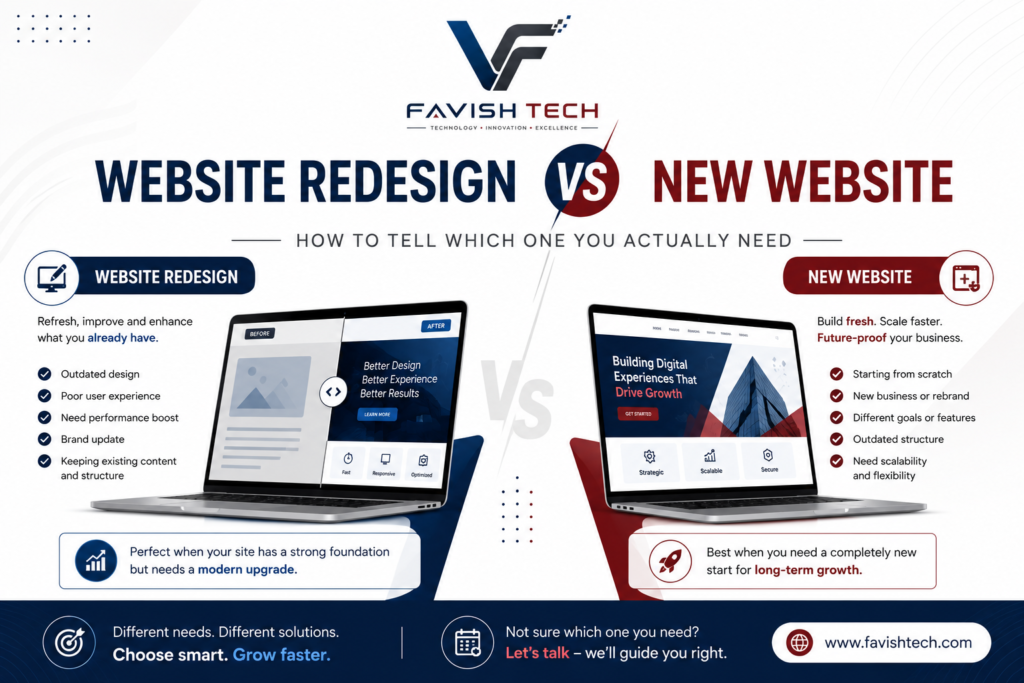
If your website feels off but you’re not sure whether it needs a full rebuild or just an update, you’re not alone, this is one of the most common (and most expensive to get wrong) decisions a business makes about its site. Pick the wrong path and you either overspend on a rebuild you didn’t need, or underspend on a patch job that doesn’t fix the real problem.
Here’s how to actually tell the difference.
Refresh, redesign, or rebuild what’s the difference?
- Refresh: Cosmetic changes — new photos, updated copy, a color or font tweak. The structure stays the same.
- Redesign: A deeper overhaul — navigation, layout, page structure, and how the site is organized. The site keeps its core platform and content but gets rebuilt around it.
- New website (rebuild): A ground-up rebuild, often on a new platform, with a new content architecture. Needed when the underlying structure itself is holding the business back.
Signs a redesign (not a full rebuild) is enough
- The site is outdated visually, but the structure and content are still reasonably solid
- Your business hasn’t fundamentally changed — same services, same audience
- The platform still works for you; it just needs a cleaner presentation
- You’re mainly getting complaints about how it looks, not how it functions
Signs you need a full new website, not just a redesign
- Your business has changed direction — new services, new audience, a repositioning that the old structure can’t fit
- Pages are poorly organized, duplicated, or confusing to both users and search engines
- You’re on a legacy or limiting platform (or a poorly built WordPress setup) that restricts what you can do
- Every small update feels like a fight — the platform itself is the problem, not just the design
- Load times and Core Web Vitals are consistently poor, and it’s a structural/technical issue, not something a plugin can fix
- You’ve redesigned before and it still underperforms — the problem isn’t cosmetic
The question that actually matters
Not “is my website old?” plenty of older sites still work fine. The real question is: is the website making it harder for customers to trust you, find you, or contact you? If yes, that’s your answer regardless of how the site looks.
Before deciding, check Google Search Console: if your pages are getting impressions but low clicks, that’s often a titles/meta description problem, a redesign fixes it. If important pages aren’t showing up in search at all, that points to a structural content/architecture issue, more likely a rebuild.
The SEO risk to know about either way
Whichever route you take, poorly planned site changes can lose real traffic, businesses can lose 15–50% of organic traffic after a redesign due to missing redirects, changed URLs with no forwarding, or lost metadata. This is the single biggest argument for doing this with someone who plans the SEO migration properly, not just the visual side.
How long does it take?
A well-scoped redesign for a small-to-mid-size business typically runs 6–12 weeks from strategy to launch. A full rebuild can take longer, especially with custom functionality or a platform migration involved. Rushing either usually means redoing it again sooner than you’d like.
Bottom line
If two or more of the “full rebuild” signs above sound like your site, a redesign alone probably won’t fix the real problem. If it’s mostly about the site looking dated while everything else still works, a redesign is the faster, cheaper, and usually sufficient option. Either way, protecting your existing SEO equity during the transition matters as much as the new design itself.
FAQ
Does a website redesign hurt my SEO rankings?
It can, if done without a proper plan, changing URLs without redirects, removing ranking content, or launching on a slower setup are the most common causes of lost traffic. Done correctly, a redesign can maintain or even improve rankings.
How do I know if I need a refresh or a full redesign?
If the core structure, navigation, and content still work and it’s mainly a visual/dated-look issue, a refresh is enough. If the structure itself is limiting the business, poor organization, wrong platform, can’t support new services – you need a redesign or rebuild.
How often should a small business redesign its website?
Most small business sites benefit from a meaningful update every 3–4 years, with ongoing content and SEO maintenance in between. A site untouched for 5+ years is typically losing ground on both design expectations and search performance.
How long does a website redesign take?
Typically 6–12 weeks for a small-to-mid-size business, depending on scope, number of pages, and how quickly content and feedback are provided.
Is it cheaper to redesign or to build a new website?
A redesign is usually cheaper since it works within the existing platform and structure. But if the existing foundation has deep SEO or technical problems, a redesign can end up costing more long-term than starting fresh, it depends on what’s actually broken.